A Versatile Game-Changer?
Controllers are funny old things.
For many players, the standard Xbox controller – or at the very least the Elite and its many alternatives – will be seen as more than enough. But every so often something comes along that tries to offer just a little bit more, whether that be in the form of more customisation, more connectivity, or more ways to play.
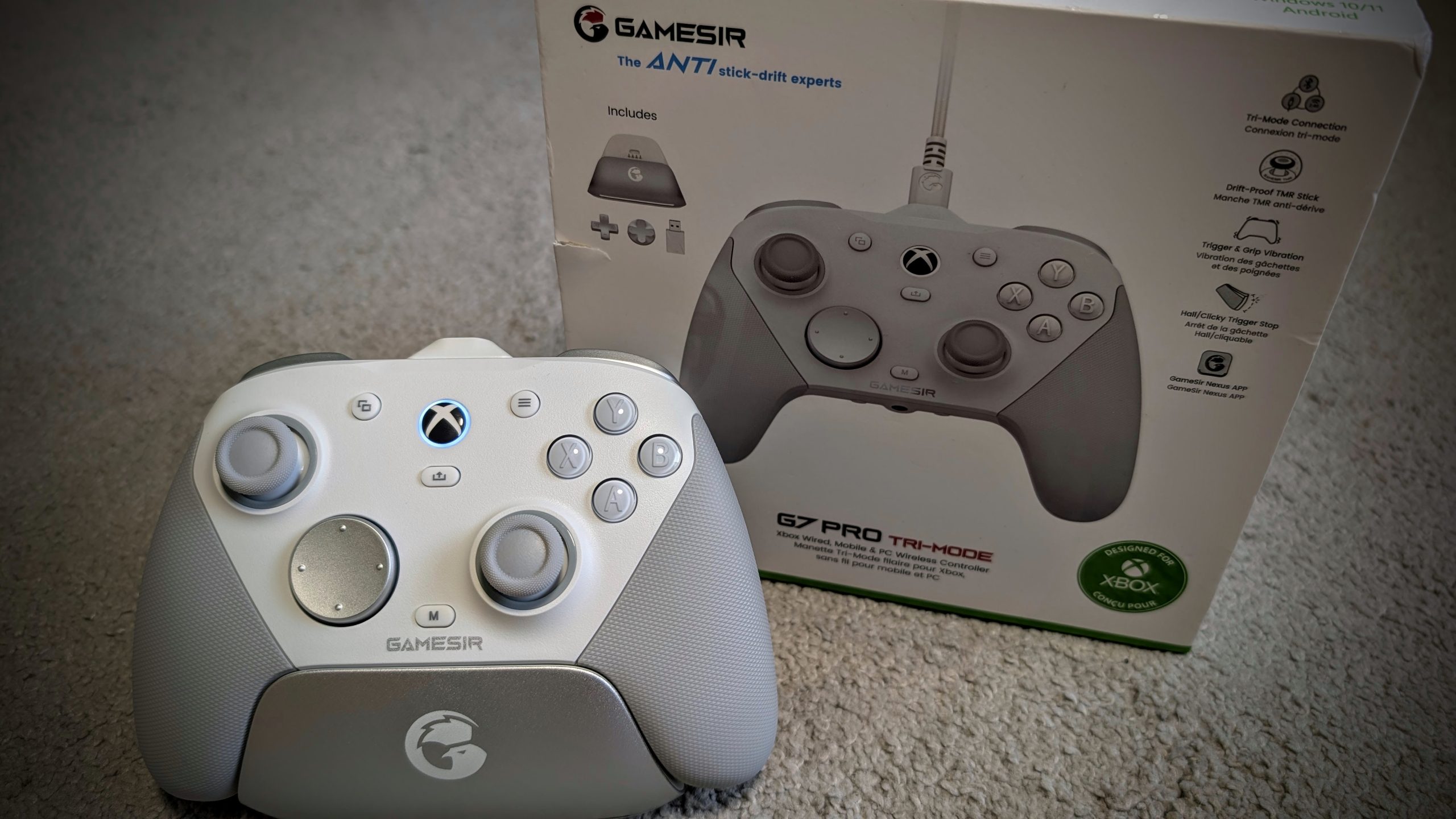
The GameSir G7 Pro Tri-Mode Controller is one such attempt, bringing a feature-packed alternative for the gaming masses, no matter whether they play on Xbox, PC, or mobile.
We’ve been hands-on with many GameSir products over the years, and in amongst those has been time with the standard G7, as well as the G7 SE. Neither really set the world on fire. But neither were the G7 Pro Tri-Mode. This thing just reeks of quality.
With tri-mode connectivity, upgraded sticks and triggers, swappable parts and a handy charging solution that ensures your set-up looks the bomb, this is clearly a controller aiming to offer versatility across multiple platforms. But does it actually deliver where it counts?

Wired Xbox vs Wireless Versatility
One of the main focus points of the G7 Pro is its tri-mode connectivity. It’s nothing new, but GameSir are hyping the tri-mode opportunities so we best cover it. See, rather than sticking to a single platform, this controller is built to work across a variety of setups. The thing is, GameSir could easily have gone further, instead of limiting things.
For Xbox players, the controller connects via a wired connection to console. And yeah, we know that a lack of wireless support for our favourite console is more than disappointing. Switch over to PC though, and things open up a little more, with both wired and 2.4GHz wireless connectivity available, thanks to the power of a USB-A dongle.
But what if you’re gaming on the go? Well, mobile or ROG Ally X play allows Bluetooth support to come to the fore, with it happily pairing with your devices. Perhaps you CAN play Xbox wirelessly then…
Switching between these modes is handled by a physical switch on the rear of the controller, which keeps things simple and avoids messing around in software menus. It’s a cinch to change too, making the G7 Pro surprisingly convenient to use across different devices.
No matter how you play, and we’ve tried this with a multitude of devices – Xbox Series X, Xbox Series S, PC, ROG Ally X and Android phone – the G7 Pro Tri-Mode works.

Mag-Res TMR Sticks and Hall Effect Triggers
There’s more though and if there’s one area where the more modern controllers are constantly trying to improve, it’s longevity. Something particularly prevalent in the sticks.
The G7 Pro makes use of GameSir’s Mag-Res TMR sticks, which aim to provide smoother control and an extended lifespan. In practice, they feel precise and responsive, offering the kind of consistency you want when lining up headshots or making the most minor of view adjustments
The triggers are handled by Hall Effect technology (something that is fast becoming standard across the board), complemented by micro-switched trigger stops. The result is a trigger pull that feels smooth when needed, but with a satisfying halt when the stops are engaged. Again, a switch around the back means these stops are easy to implement, pretty much on the fly.
Additional Buttons and Optical Switches
The G7 Pro isn’t shy about giving players options when it comes to the rest of the controls either.
Alongside the standard layout, you’ll find additional buttons that can be mapped to suit your playstyle; a couple around the back, sitting on the middle finger grip, and two more ‘mini bumpers’ up and between the triggers and standard bumpers. These are surprisingly well placed, in fact.
The main buttons themselves also receive some attention. The ABXY buttons use optical micro switches, while the D-pad is complete with a mechanical design. The end result is a button press that feels crisp and consistent.
Speaking of the D-pad, the G7 Pro Tri-Mode also includes a couple of additional interchangeable D-pads, allowing you to swap styles depending on preference. We prefer the default ‘disc’, but should you want a couple of more ‘old-school’ versions, you are sorted.

Magnetic Faceplates
Visual customisation is another area where the G7 Pro shows its flexibility. The controller features a three-part magnetic faceplate, making it easy to remove and swap sections without any fuss. We’re not sure why you would want to change these (especially the brilliantly textured rubber arm grips aside from some weird need to look at the rumble motors within), but if you want to go adjusting the look or simply wish to experiment with different setups, the magnetic system keeps the process quick and painless.
Of less interest to us, but perhaps more relevant going forward, what with the blurring of console and PC lines is that players get access to one of the more interesting features on the controller – a built-in gyroscope. Should you be looking for, or enjoy such a control type, or want another layer of precision, it’s a feature that can open up new possibilities.
Performance on PC is further boosted by a 1000Hz polling rate, available through both wired and 2.4GHz wireless connections. We can’t get over the fact that we need a cable to connect to Xbox consoles, but if you do game through PC, perhaps making the most of PC Game Pass, you’ll like what you find with the G7 Pro Tri-Mode.
The Hub of Power: A High-End Charging Solution
Another highlight of the G7 Pro package is the charging station. This thing looks great and works perfectly. Drop the controller onto the dock and charging begins automatically; LEDs signifying charging status. Pick it up and you’re ready to play. Connectivity is via a four-pin approach, and we’ve found it to work perfectly. That dock plays host to the USB-A dongle if required too, slotting in on the underside to ensure a nice, neat design.
It really does amplify the whole G7 Pro Tri-Mode package to another level and if you do play wirelessly, expect the G7 Pro Tri-mode to last well into the wee hours, pulling on the power of a 1200mAh battery as it goes.
Of course, if you still need more from the G7 Pro Tri-Mode, GameSir’s software allows players to tweak and tailor the controller to suit their preferences. The GameSir App works fine, from button mapping to various adjustments, providing the tools needed to fine-tune the experience. And of course, there’s a 3.5mm headset jack on the controller, as well as a mic-mute button, making it easy to plug in a headset and stay connected to your mates.

Not Quite the Ultimate Multi-Platform Choice
So, the GameSir G7 Pro Tri-Mode Controller is clearly built with flexibility in mind. Between its tri-mode connectivity, removable faceplates, fancy buttons and upgraded sticks and triggers, there’s plenty here for players who enjoy having options.
This is a controller that feels comfortable and responsive while offering a number of extra features, particularly for PC users. The problem comes in the need to run a cable if you’re gaming on Xbox consoles. That’s a massive shame that could hold this back from being one of the finest controllers of recent years.
Still, the G7 Pro delivers a well-rounded and versatile package that works across multiple platforms without overcomplicating things. If you’re looking for a controller that can comfortably jump between Xbox, PC and mobile gaming, the GameSir G7 Pro Tri-Mode makes a strong case for itself.
Huge thanks go out to GameSir for a review unit of the G7 Pro Tri-Mode. Pick one up for yourself from GameSir direct, or maybe even Amazon. Expect to pay £89.99 which, honestly, feels a decent price for what you’re getting.
**If you use our Amazon affiliate link, we may receive a small commission. We thank you for the support**