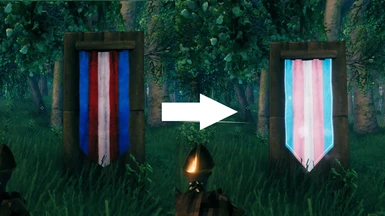
This mod replaces the “Blue, red and white banner” with the colors it should’ve been from the start: Light blue, pink, and white. Trans rights are human rights.
Requirements
Permissions and credits
Credits and distribution permission
Other user’s assets All the assets in this file belong to the author, or are from free-to-use modder’s resources
Upload permission You are not allowed to upload this file to other sites under any circumstances
Modification permission You are allowed to modify my files and release bug fixes or improve on the features without permission from or credit to me
Conversion permission You are not allowed to convert this file to work on other games under any circumstances
Asset use permission You are allowed to use the assets in this file without permission or crediting me
Asset use permission in mods/files that are being sold You are not allowed to use assets from this file in any mods/files that are being sold, for money, on Steam Workshop or other platforms
Asset use permission in mods/files that earn donation points You are not allowed to earn Donation Points for your mods if they use my assets
Author notes
This author has not provided any additional notes regarding file permissions
File credits
denikson for the preconfigured Valheim BepInExPack aedenthorn for creating Custom Textures migeli for creating Custom Banners, which I used as a reference and for the BumpMap texture.
Donation Points system
This mod is not opted-in to receive Donation Points
Changelogs
Version 1.0.0
Created flag texture
Named file, mod uploaded
I really wanted a trans flag to hang up, and this banner is already so close to being that. So using aedenthorn’s Custom Textures mod, I replaced it! For now, the actual banner texture is all that is changed. I’m having issues with replacing the crafting menu icon and will update with that when I can.
If you don’t like the “messy” texture Valheim overlays on flags and want a cleaner look, I uploaded the BumpMap file from MikaelS’s Custom Banners as an optional download. The file is named incorrectly on their mod, so I’ve renamed it correctly and uploaded it here.
– Move the CustomTextures folder from my mod into your Valheim’s /BepInEx/plugins folder. – It should work with mod managers as well, let me know if there’s trouble with any specific one and I’ll look into it.
We use cookies on our website to give you the most relevant experience by remembering your preferences and repeat visits. By clicking “Accept”, you consent to the use of ALL the cookies.
This website uses cookies to improve your experience while you navigate through the website. Out of these, the cookies that are categorized as necessary are stored on your browser as they are essential for the working of basic functionalities of the website. We also use third-party cookies that help us analyze and understand how you use this website. These cookies will be stored in your browser only with your consent. You also have the option to opt-out of these cookies. But opting out of some of these cookies may affect your browsing experience.
Necessary cookies are absolutely essential for the website to function properly. These cookies ensure basic functionalities and security features of the website, anonymously.
Cookie
Duration
Description
cookielawinfo-checkbox-analytics
11 months
This cookie is set by GDPR Cookie Consent plugin. The cookie is used to store the user consent for the cookies in the category "Analytics".
cookielawinfo-checkbox-functional
11 months
The cookie is set by GDPR cookie consent to record the user consent for the cookies in the category "Functional".
cookielawinfo-checkbox-necessary
11 months
This cookie is set by GDPR Cookie Consent plugin. The cookies is used to store the user consent for the cookies in the category "Necessary".
cookielawinfo-checkbox-others
11 months
This cookie is set by GDPR Cookie Consent plugin. The cookie is used to store the user consent for the cookies in the category "Other.
cookielawinfo-checkbox-performance
11 months
This cookie is set by GDPR Cookie Consent plugin. The cookie is used to store the user consent for the cookies in the category "Performance".
viewed_cookie_policy
11 months
The cookie is set by the GDPR Cookie Consent plugin and is used to store whether or not user has consented to the use of cookies. It does not store any personal data.
Functional cookies help to perform certain functionalities like sharing the content of the website on social media platforms, collect feedbacks, and other third-party features.
Performance cookies are used to understand and analyze the key performance indexes of the website which helps in delivering a better user experience for the visitors.
Analytical cookies are used to understand how visitors interact with the website. These cookies help provide information on metrics the number of visitors, bounce rate, traffic source, etc.
Advertisement cookies are used to provide visitors with relevant ads and marketing campaigns. These cookies track visitors across websites and collect information to provide customized ads.