Hello everyone, welcome back to the itch.io changelog. In our changelog blog posts we hope to recap some of the feature updates that we’ve deployed that didn’t get their own blog post, and may have been only posted in the Developer Updates forum.
To share today we have a brand new way to browse sales, a complete overhaul of bundle hosting, a modernized jam theme editor, and a rebuilt Patreon integration.
Introducing the Sale Explorer
The Summer Sale is live right now (through July 6th!) with over 30,000 discounted projects, and with it we’ve launched the Sale Explorer: a new browsing experience built for digging through massive sales to find exactly what you’re looking for.
- Exclusion filters: For the first (official) time on itch.io, you can exclude tags and classifications from your results. Not interested in a genre? Click the X and it’s gone from the results.
- Subcategory counts: Popular subcategories are shown alongside project counts so you can see at a glance where to dig deeper.
- Accurate price filters: Filter by the final sale price, so you find something that matches your budget.
- Staff Picks: A filter that highlights projects approved by our review team. It’s on by default during the sale, but you can toggle it off to browse everything.
- My Recommendations: A new sorting mode that orders results based on your account’s interests, matching tags and classifications against your history on itch.io.
- Find Similar: Sort projects with comparable classifications to the top of your results.
The Sale Explorer automatically takes over the sales page during site-wide seasonal sales. We’re happy with how it turned out, and we hope to bring many of these enhancements to our standard browse pages in the future.
Bundle hosting, revamped
Our bundle system has been around for over a decade, and this year we finally gave the hosting side a complete overhaul. If you’ve ever tried to organize a large collaborative bundle, these changes are for you:
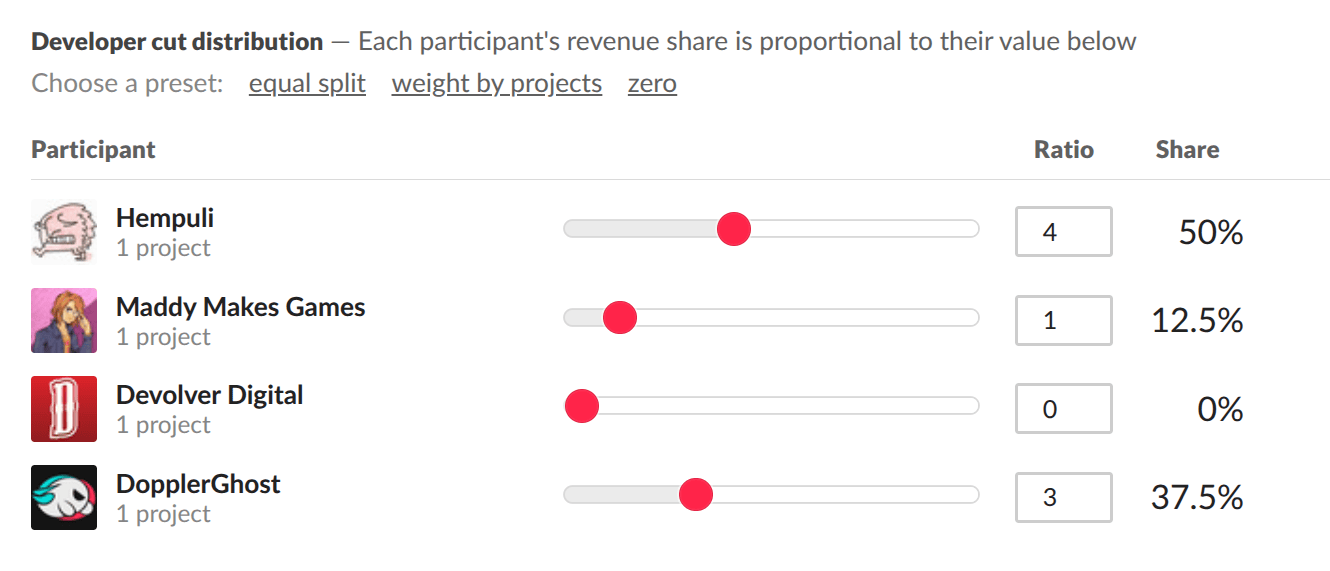
- Fully editable drafts: Bundles can now be edited freely while in draft mode, before participants approve. It’s no longer necessary to delete and recreate a bundle just to fix a mistake.
- New revenue split editor: We replaced the old whole-number percentage slider with ratio-based splits accurate to two decimal places.
- Bulk import: Paste a jam or collection URL to import all of its projects into your bundle at once.
- Drag-and-drop reordering: Rearrange the projects in your bundle by dragging them.
- Pruning stalled participants: An opt-in option lets hosts remove up to 15% of projects if needed to get a bundle publication-ready, for those cases where a participant just isn’t responding.
- Reset participation: Hosts can reset participant approval status to put the bundle back into an editable state. Help you avoid having to recreate the bundle if major changes need to be made.
- Better analytics: Bundle analytics pages now include daily and weekly view graphs along with total view counts.
Existing pending bundles can take advantage of the new features after resetting participation.
Jam theme editor revamp
We’ve modernized the jam theme editor, migrating it to the same theme editor UI used elsewhere on the site, while taking care to preserve existing custom CSS jam pages. Jam hosts get a bunch of new customization options:
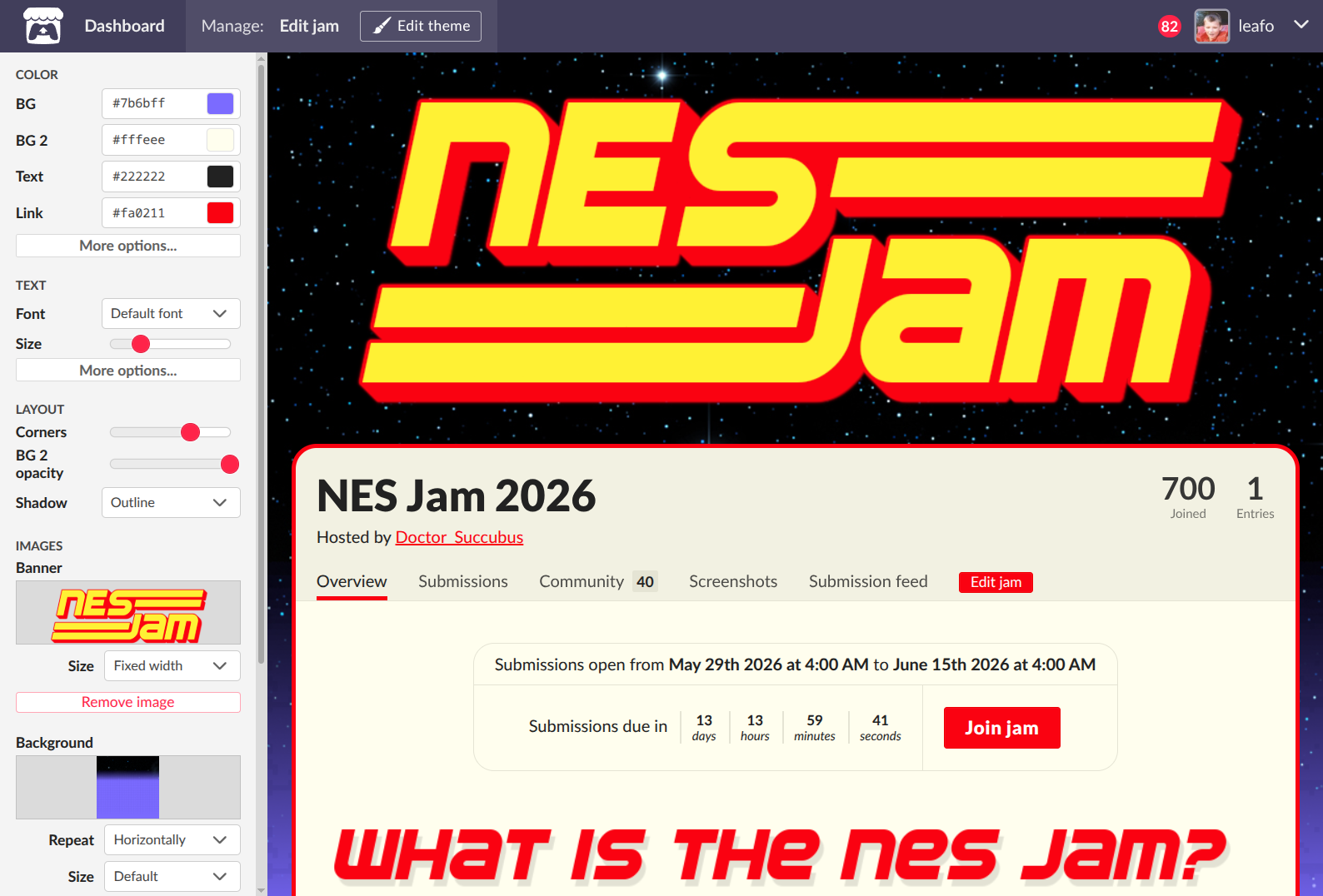
- Fonts: Pick body and header fonts from Google Fonts, and adjust the page-wide font size with a slider.
- More color controls: Buttons can now be colored independently of links, and headers get their own text color setting.
- Corner radius & effects: Round the corners of your main content area, and apply preset shadow, outline, and glow effects derived from your theme colors.
- Better backgrounds: Background images now support “cover” and “contain” sizing plus fixed positioning, and a new content opacity slider lets your page background show through the content area.
- Copy & paste themes: Themes can be copied as a JSON string and pasted into another jam, perfect for recurring jam hosts who want a consistent look. (Images need to be re-uploaded.)
For those of you writing custom CSS, check the announcement post for the full details about the markup changes we made.
Enhanced Patreon integration
We’ve rebuilt our Patreon integration on Patreon’s V2 API. Access can now be granted based on membership tiers instead of pledge amounts, which fixes our longstanding issues with granting access to patrons who paid in different currencies. Creators now have three ways to grant access to their projects:
- Any paid membership: Anyone subscribed to a paid tier gets access.
- Specific tiers: Choose exactly which of your tiers unlock access, including free tiers.
- Minimum pledge amount: The classic option is still available for those who need it.
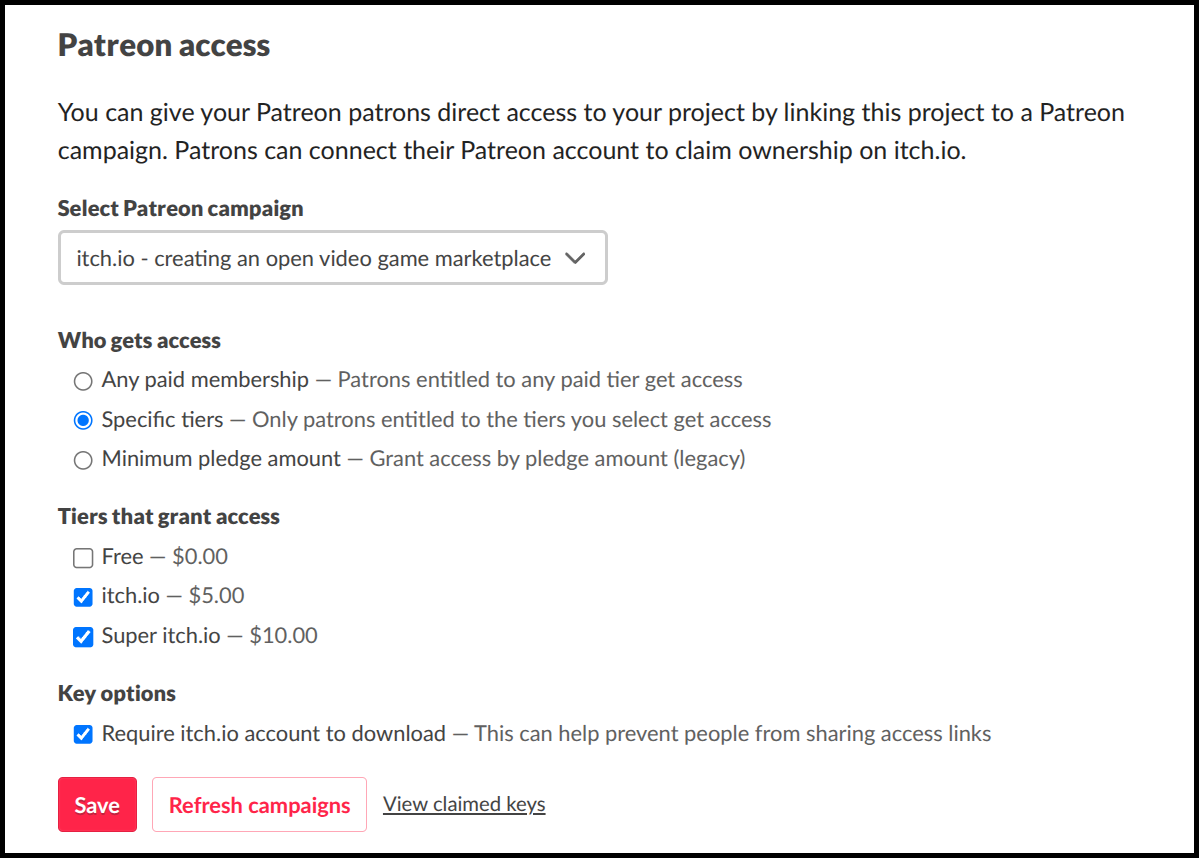
The new system also handles cases the old one couldn’t:
- Gifted memberships now count, patrons who received tier access as a gift can claim your project.
- Cancelled subscriptions are respected patrons keep their entitlement through the end of the period they paid for.
- No more currency rejections when using tier-based access, regardless of what currency your patrons pledge in.
As before, once a patron claims access to a project, they keep it indefinitely. Membership is checked at grant time.
That’s all for now
That wraps up this changelog. As always, if you run into any issues or have feedback on any of these features, let us know on our community forums or reach out to support. Thanks for reading!